
The Best Software Testing Tool? That’s Easy…
4 comments Posted by Eric Jacobson at Thursday, May 21, 2015Notepad.
After experimenting with a Test Case Management application’s Session-Test tool, a colleague of mine noted the tool’s overhead (i.e., the non-test-related waiting and admin effort forced by the tool). She said, I would rather just use Notepad to document my testing. Exactly!
Notepad has very little overhead. It requires no setup, no license, no logging in, few machine resources, it always works, and we don’t waste time on trivial things like making test documentation pretty (e.g., let’s make passing tests green!).
Testing is an intellectual activity, especially if you’re using automation. The test idea is the start. Whether it comes to us in the midst of a discussion, requirements review, or while performing a different test, we want to document it. Otherwise we risk losing it.
Don’t overlook the power of Notepad.
Don’t Bother Indicating “Pass” or “Fail”
1 comments Posted by Eric Jacobson at Tuesday, August 05, 2014This efficiency didn’t occur to me until recently. I was doing an exploratory test session and documenting my tests via Rapid Reporter. My normal process had always been to document the test I was about to execute…
TEST: Edit element with unlinked parent
…execute the test. Then write “PASS” or “FAIL” after it like this…
TEST: Edit element with unlinked parent – PASS
But it occurred to me that if a test appears to fail, I tag said failure as a “Bug”, “Issue”, “Question”, or “Next Time”. As long as I do that consistently, there is no need to add “PASS” or “FAIL” to the documented tests. While debriefing about my tests post session, the assumption will be that the test passed unless indicated otherwise.
Even though it felt like going to work without pants, after a few more sessions, it turns out, not resolving to “PASS” or “FAIL” reduces administrative time and causes no ambiguity during test reviews. Cool!
Wait. It gets better.
On further analysis, resolving all my tests to “PASS” or “FAIL” may have prevented me from actual testing. It was influencing me to frame everything as a check. Real testing does not have to result in “PASS” or “FAIL”. If I didn’t know what was supposed to happen after editing an element with an unlinked parent (as in the above example), well then it didn’t really “PASS” or “FAIL”, right? However, I may have learned something important nevertheless, which made the test worth doing…I’m rambling.
The bottom line is, maybe you don’t need to indicate “PASS” or “FAIL”. Try it.
Multiple Computers Are a Must For Testers
6 comments Posted by Eric Jacobson at Monday, September 30, 2013I can’t imagine testing without multiple computers at my disposal. You may want to hold on to your old, out of warranty computers if given the choice. Five quick reasons:
- When Computer#1 hits an impediment such as an unrecoverable error, Computer#2 can start testing immediately as Computer#1 reboots.
- I can use both computers to simulate interesting multi-user tests. Example: what if two users attempt to acquire locks at roughly the same time.
- I can kick off timely processes, staggered on 3 separate boxes, so as not to sit idle waiting.
- Different OS’s, browser versions, frameworks, and other software running in the background can be informally tested to narrow down variables.
- Computer#1 can support the administrative work of testing (e.g., documenting tests, bugs, emailing), while Computer#2 can stay clean and focus on operating the product under test.
Test in Bullet Time With Tablock SQL Hints
2 comments Posted by Eric Jacobson at Wednesday, December 19, 2012
Every once in a while, progs amaze me by casually offering some off-the-cuff solution to my major testing headaches.
I was trying to recreate a complex user scenario involving precise timing. I needed a way to make a service hang (blocking other services), sneak some specific test actions through in the meantime, then unhang the service. After assuming this would be way too complicated for me, my prog offered, “just use a SQL hint to put an exclusive lock on the table”.
A SQL hint is an addition to the query that instructs the database engine to do something extra, overriding its normal decisions. The tabblock hint, wrapped in a transaction, allows you to put an exclusive lock on a table, preventing other transactions from reading or modifying said table. I’m using MS SQL but Oracle supports a similar technique.
Here is how it works in a generic test example:
- State A exists.
- Lock the table:
begin TRANSACTION
UPDATE tblCustomers
WITH (TABLOCK)
SET Name = 'Fred'
WHERE (ID = 10)
Note: The transaction remains open. The update statement is irrelevant because we are going to roll it back. - Trigger the action you want to hang. For example: maybe the current UI state is ready for female customers. You trigger a service that returns female customers from tblCustomers to display them on the UI. Take your time, it won’t complete due to the tablock.
- Perform the action you are trying to sneak in. For example: maybe you change the UI to expect male customers.
- Now State B exists instead of State A.
- Unlock the table:
ROLLBACK TRANSACTION
Note: execute the above statement in the same query session as the query in step 1 was executed. The action that was hanging in step 3 completes, and in this example, female customers attempt to load into a screen expecting male customers.
So the next time you have a test idea that is too complex to execute in real time, try doing it in bullet time (using a tablock hint to slow things down.)
The Most Important Part Of Test Automation
1 comments Posted by Eric Jacobson at Wednesday, May 23, 2012…is the checks, stupid.
It doesn’t matter what framework you are using, what language you write them in, or how many you have. What matters is how effectively your automated checks help determine ship decisions.
- What should your automated checks observe?
- What decision rules should your automated checks use to determine pass/fail?
Those are the two hardest questions to answer. You can’t Google them. You can’t ask your testing mentors. You’re tempted to hide your decisions when they’re poorly conceived (because you know few will ask). You’re tempted to focus on what you know people will ask; the questions with the shortest answers: How many automated checks? Did they pass?
But, what are they checking? You know that’s what matters. Start building your automated check suite there. The rest can follow.
CAST2011 was full of tester heavy weights. Each time I sat down in the main gathering area, I picked a table with people I didn’t know. One of those times I happened to sit down next to thetesteye.com blogger Henrik Emilsson. After enjoying his conversation, I attended his Crafting Our Own Models of Software Quality track session.
CRUSSPIC STMPL (pronounced Krusspic Stemple)…I had heard James Bach mention his quality criteria model mnemonic years ago. CRUSSPIC represents operational quality criteria (i.e., Capability, Reliability, Usability, Security, Scalability, Performance, Installability, Compatibility). STMPL represents development quality criteria (i.e., Supportability, Testability, Maintainability, Portability, Localizability).
Despite how appealing it is to taste the phrase CRUSSPIC STMPL as it exercises the mouth, I had always considered it too abstract to benefit my testing.
Henrik, on the other hand, did not agree. He began his presentation quoting statistician George Edward Pelham Box, who said “…all models are wrong, but some are useful”. Henrik believes we should all create models that are better for our context.
With that, Henrik and his tester colleagues took Bach’s CRUSSPIC STMPL, and over the course of about a year, modified it to their own context. Their current model, CRUCSPIC STMP, is posted here. They spent countless hours reworking what each criterion means to them.
They also swapped out some of the criteria for their own. Of note, was swapping out the 4th “S” for a “C”; Charisma. When you think about some of your favorite software products, charisma probably plays an important role. Is it good-looking? Do you get hooked and have fun? Does the product have a compelling inception story (e.g., Facebook). And to take CRUCSPIC STMP further, Henrik has worked in nested mnemonics. The Charisma quality item descriptors are SPACE HEADS (i.e., Satisfaction, Professionalism, Attractiveness, Curiosity, Entrancement, Hype, Expectancy, Attitude, Directness, Story).
Impressive. But how practical is it?
After Henrik’s presentation, I have to admit, I’m convinced it has enough value for it’s efforts:
- Talking to customers - If quality is value to some person, a quality model can be used to help that person (customers/users) explain which quality criteria is most important to them. This, in turn, will guide the tester.
- Test idea triggers - Per Henrik, a great model inspires you to think for yourself.
- Evaluating test results – If Concurrency is a target quality criterion, did my test tell me anything about performing parallel tasks?
- Talking about testing – Reputation and integrity are important traits for skilled testers. When James Bach or Henrik Emilsson talk about testing, their intimate knowledge of their quality models gives them an air of sophistication that is hard to beat.
Yes, I’m inspired to build a quality criteria model. Thank you, Henrik!
Run a SQL Trace To Look Behind The Curtain
5 comments Posted by Eric Jacobson at Tuesday, July 26, 2011When we find a bug with repro steps we typically leave the deep investigation to our Progs and move on to the next test. But sometimes it’s fun to squeeze in a little extra investigation if time permits.
My service calls were not returning the expected results so my Prog showed me a cool little trick; how to capture the SQL being passed into my DB for specific service calls. This technique is otherwise known as performing a SQL trace. We ran a SQL trace and with a bit of filtering and some timing, we easily captured the SQL statements being triggered via the called service. We extracted the SQL from the trace and used it to perform direct DB calls. Said isolation helped us find the root problem; a bad join.
Ask your Progs or DBAs which tools they use to perform SQL Traces. We used SQL Profiler and SQL Server 2008 R2. Make sure they show you how to filter down the trace (e.g., only show TSQL, to a certain DB, sent from a specific trigger like a user or service) so you don’t have to sift through all the other transactions.
Problem Steps Recorder – Windows 7 Test Tool
3 comments Posted by Eric Jacobson at Tuesday, February 22, 2011
Don't Bother With Microsoft Test Manager 2010
74 comments Posted by Eric Jacobson at Wednesday, October 27, 2010- Before one can write tests, one must set up a Test Suite. Test Suites do not update when the Feature set changes. Thus, one must manually keep one’s Test Suite synched with one’s iteration. To further frustrate, without customization, Test Manager does not let one write test cases for Task work items.
- Test cases in Test Manager follow a different workflow than those of TFS. The result is, nobody on your team can see which of your tests pass or fail unless they open Test Manager, which they probably don’t have a license for (unless they are testers). The reasoning behind this is probably Test Manager’s test cases can have test case run execution history (e.g., TestA could be passed in one build and failed in another build at the same time ). Test case run execution history is actually cool. In fact, it was one of the biggest motivators for us to try Test Manager. However, we were hoping Test Manager would trickle down the results to TFS so the whole team could benefit.
- One of the most annoying parts of our Test Manager trial may have been its usability and performance. The screens frequently hung, causing some testers to force quit and re-launch. The navigation was also awkward. It took too many clicks to get anything done.
- To update the execution status of Test Manager tests, one must go through the ridiculous test case executor. This is the thing that shows you each test case step and asks you for a pass/fail result. I can’t imagine anyone actually testing like this. Quality Center had something similar but provided an alternate method of updating execution status (i.e., one could bulk update via a grid).
- Our other gripe about updating the execution status of Test Manager tests is that the test case “summary” does not show. Most testers like to write their test cases as fragments, using the test case work item’s free-form summary tab. The summary tab is preferred over the grid, which forces tests into individual steps with expected results. The big joke is, if you write your tests in the summary tab, it is not possible to see them while running the silly test case executor. So you are presented with a blank test step and asked if it passes or fails.
- Calling our CodedUI test methods and passing in parameters. According the idealistic demo I saw at the Stareast Microsoft booth, this allows manual testers to write/execute automated tests without coding.
- Using test case run execution for regression testing.
Automated Report Testing - JART Expansions
0 comments Posted by Eric Jacobson at Friday, December 11, 2009I brainstormed with my report dev and we came up with two valuable JART expansions.
The first is coded and has already found two bugs (and saved me from days of bordom). Comprehensive data checking in the report output is complicated but what about checking for data that is missing? My reports display the string “[Not Found]” when data fields get mapped incorrectly or other datasource problems occur. It only took about an hour to write a function that scans all report results looking for the string. Since JART already exported each report result to a text file, I simply automated Notepad’s Find functionalty to look for specific strings passed into my SearchReportResultsForString function. This was way easy. Now JART checks about 2240 distinct data columns across 113 reports for this issue.
I use said function to also look for the “No Data Found” string. If I find this string it means the report results returned but other than the cover page, no data matching the search criteria exists. This check gets reported as a “Warning” or inconclusive result. I use it to help me determine when I need to adjust my filter criteria parameters on each report.
The second expansion is to build a routine that saves off the report results of each iteration as “Iteration N Baselines”. Then, using the same report filter criteria and same data store, save off the next iteration’s report results as “Iteration N+1 Baselines”. Once JART has at least two iterations of baselines, JART will compare the files from each baseline to ensure nothing has changed. If I can pull this off, it will be HUGE. I’m expecting it to only support about 75% of my reports. The other 25% is time sensitive data that may not have a way to remain frozen in time.
Yesterday, a dev pointed out that the reports display the report execution date (i.e., the current date) in the header and footer. Thus, they should never match. Ooops! I think I can still work around it, but it does complicate things a bit.
Teaching Exploratory and Session Based Testing
8 comments Posted by Eric Jacobson at Tuesday, December 01, 2009My former manager and esteemed colleague asked me to teach a two hour class about Session Based Testing (SBT). We had tried SBT a couple years ago, when I was fresh out of Michael Bolton’s excellent Rapid Software Testing course.
I was nervous as hell about the class because most of the testers I work with were signed up and I knew this was an opportunity to either inspire some great testing or look like a fool. So I spent several weeks researching and practicing what I would teach. I decided an Exploratory Testing (ET) primer was necessary for this audience before SBT could be explained properly.
ET proved to be the most intimidating subject to explain. Most of what I found was explained by members of the Context-Driven School (e.g., James and Jon Bach). Nearly everything I found NOT explained by members of the Context-Driven School was heavily criticized (by members of the Context-Driven School) for not being true ET. With all this confusion over what ET actually is, one wonders how well the Context-Driven School has actually explained what they mean. I found various statements from videos, blogs, papers, and my RST courseware that ranged from...
- It’s a technique…no it’s a method…no it’s a “way of testing”.
- It’s the opposite of scripting…no, it can used with scripting too, even while automating.
- All testers use ET to some extent…no wait, most testers aren’t using it because they don’t understand it.
- Time Boxing
- Missions
- Capturing Notes, Bugs, and Issues
- Debriefing
In the end, about half the audience appeared luke warm while the other half appeared skeptical to confused. I blame it on my own delivery. I think more light bulbs went off during the ET section. SBT takes a bit more investment in thought to get it.
For myself, however, the class was a success. Ever since my research, I’ve actually been using SBT and I love it! I also have some better ideas on how to teach it if I ever get a second chance. Special thanks to Michael Bolton and James Bach, who continue to influence my testing thoughts in more ways than anyone (other than myself).
JART found a bug this morning. But it wasn't in my AUT.
JART had been happily smoke testing our pre-production environment this morning for an hour. I was eagerly awaiting the results for a group of anxious managers. After seeing QTP’s auto-generated test results consistently for 144 previous test runs, QTP suddenly decided to give me this instead of the results:
I didn’t change any versions of any software on this box, of course. After waiting another hour while JART repeated all the tests, the next results file was fine. …Annoying.
JART – Automating Verifications For Report AUTs
1 comments Posted by Eric Jacobson at Wednesday, May 20, 2009
If your test automation doesn’t verify anything useful, it is essentially worthless. First, there are some basic tests I decided to programmatically verify with JART. These are tests that often fail during manual testing.
- Can I access the report app for a given environment?
- Does a working link to each report exist?
- Does each report’s filter page display?
- Does each report’s filter page display the expected filter controls I care about?
The above can be verified without even executing any reports. Piece of cake!
Next, I need to verify each report executes with some flavor of expected results. Now I’m bumping it up a notch. There are an unlimited amount of results I can expect for each report and these all require knowledge or control of complex reportable business data. This also means I have to examine the report results, right? My AUT uses MS ActiveReports and displays results in an object not recognized by QuickTest Pro. According to the good folks at SQA Forums, the standard way to extract info from the results is to use the AcrobatReaderSDK, which I don’t have. The workaround, which I use, is to install a free app that converts pdf files to text files. I wrote a little procedure to save my report results as pdf files, then convert them to text files, which I can examine programmatically via QuickTest Pro. So far, it works great. The only disadvantage is the extra 5 seconds per report conversion.
So what am I examining in the report results for my verifications? So far, I am just looking at each report’s cover page, which displays the specified filter criteria returned, along with its filter name (e.g., “Start Date = 3/20/2006”). If it returns as expected, I have verified the AUT’s UI is passing the correct filter parameters to the report services. This has been a significant failure point in the past, which is no surprise because the UI devs and service devs are poor communicators with each other.
Currently, JART verifys 59 Reports and up to 9 filters on each. It takes about 1 hour to complete. JART is ready to perform my next sanity test when we go live. So far I have put in about 24 hours of JART development.
I’ll discuss the simple error handling JART uses in a future post.
Note: The failures from the test run result summary above were the results of QuickTest Pro not finding the text file containing the converted report results. I couldn’t repro this JART error but now I may have to invest time researching the fluke and determining how to handle it. This is time not spent testing my AUT.

Since I have about 150 distinct reports, each with their own combinations of shared filter controls and possible filter values, I made a matrix in MS Excel. The matrix rows represent each report, the columns represent each filter control, and the intersections are the filter values I use to pass into JART for each report’s filter criteria controls. This single spreadsheet controls all the tests JART will execute.
Another advantage, for me, to controlling the tests via an Excel spreadsheet is that my BL already maintains an Excel spreadsheet that specifies which of the 150 reports should be available in each build. The BL’s list can control which reports JART tests, just like the BL's list controlled which reports I tested.
JART simply loops through each report in said matrix and provides standard verifications for each. Verifications are important, and tricky for report AUTs, so I’ll save those for the next post.
It’s true what they say; writing automated tests is waaaay more fun than manual testing. Unfortunately, fun does not always translate into value for your team.
After attempting to automate an AUT for several years, I eventually came to the conclusion that it was not the best use of my time. My test team resources, skills, AUT design and complexity, available tools, and UI-heavy WinForm AUT were a poor mix for automated testing. In the end, I had developed a decent framework, but it consisted of only 28 tests that never found bugs and broke every other week.
Recent problems with one of my new AUT’s have motivated me to write a custom automated test framework and give the whole automated test thing another whirl.
This new AUT has about 50 reports, each with various filters. I’m seeing a trend where the devs break various reports with every release. Regression testing is as tedious as it gets (completely brainless; perfect to automate) and the devs are gearing up to release another 70 additional reports! …Gulp.
In this case, several aspects are pointing towards automated test potential.
- The UI is web-based (easier to hook into)
- The basic executed test is ripe for a data-driven automation framework; crawl through 120 reports and perform nearly the same actions and verifications on each.
- Most broken report errors (I’m targeting) are objectively easy to identify; a big old nasty error displays.
I wrote the proof of concept framework last week and am trying to nail down some key decisions (e.g., passing in report parameters vs. programmatically determining them). My team needs me to keep testing, so I can only work on automation during my own time…so it’s slow going.
This is my kick-off post. I’ll explain more details in future posts. More importantly, I’ll tell you if it actually adds enough value to justify the time and maintenance it will take. And I promise not to sugar coat my answer, unlike some test automation folks do, IMO.
Oh, I’m calling it JART (Jacobson’s Automated Report Tester). Apparently JART is also an acronym for "Just a Real Tragedy. We’ll see.
I’m surprised by how many people still send around bmp files of their entire desktop when they are only interested in showing some small error message displaying in a little window. They are using the [Print Screen] key. Some, at least know they can use [Alt]/[Print Screen] to capture only the active window.
Others prefer to capture only the area the audience needs to understand; they may use a screen capture app. I’ve been using Wisdom-soft’s free ScreenHunter . I’ve got it customized to capture the area within a rectangle I draw, after pressing F6. After drawing my rectangle, its contents capture as an auto-named gif file and a clipboard item.
Screen-capture-type-stuff I think about :
- I try to avoid screen capturing error messages, opting instead to capture the error message in text format, from an error log. That way the dev can see the whole message and copy the text if they want to search the code or something. If the devs don't log the error, they're stuck with a screen capture.
- If the screen capture needs other context (e.g., which programs are running in my tray, what time is it) I still capture the entire desktop.
- Occasionally I mark up the screen capture (in Paint.NET) to circle something or add other annotations.
- If capturing action is better, I capture video.
- Sometimes I save time by using a screen capture to support repro steps. Example: Capture a filter page for a report and write a repro step that says "specify all filter criteria as depicted in the screen capture".
What (free) screen capture program do you use? What screen capture tips did I miss?
Perlclip - The Perfect Text String Test Tool
4 comments Posted by Eric Jacobson at Wednesday, August 13, 2008I finally added Perlclip to my tray. I use it several times a week when I have to test text field inputs on my AUT. Among other things, this helpful little tool, created by James Bach, allows one to generate a text string with a specific character count. That alone is not very cool. However, the fact that the generated text string is comprised of numbers that indicate the count of the following astrisk is way cool.
Example: If I create a "counterstring" of 256 characters, I get a string on my clipboard that can be pasted. The last portion of the string looks like this...
12*216*220*224*228*232*236*240*244*248*252*256*
Each number is telling you the character number of its following astrisk. Thus, the last astrisk is character #256. The last "6" is character #255. Get it? So if you don't have a boundary requirement for a text input field, just paste in something huge and examine the string that got saved. If the last portion of the saved string looks like this...
0*43*46*49*52*55*58*61*6
...your AUT only accepted the first 62 characters.
If your company doesn't have a BBTest Assistant license, Microsoft's free Windows Media Encoder in its Windows Media Encoder 9 Series download has an awesome screen capture to video tool and a wizard that does all the setup for you. I've been having fun attaching videos to my bug reports and since they include even more info than still screen captures, they'll hopfully increase bug turn around.
Here's a sample video of a little MS Word bug James Whittaker describes in his book "How to Break Software". (The message indicating the index columns must be between 0 and 4 displays twice.)
Do you use bug templates? You should. Unfortunately, good bug reports require lots of overhead. It’s not enough to just enter your perfected repro steps. You have to enter a severity, priority, area, version tested, assign it to someone, etc. Because these tedious fields are often entered with the same values, you can make logging bugs a quicker and more pleasant experience by starting with a template that already has your typical entries. How? This, of course, depends on your bug tracking system. Lately, I’ve been using Microsoft VSTS or Mercury Quality Center (TestDirector). If you use VSTS, download the TFS Work Item Templates Power Tools release. I used it to create various templates for the common chunks of bug entries I submit. All my templates also add starter text in the description field like “Repro Steps:” which is the heading above the repro steps.
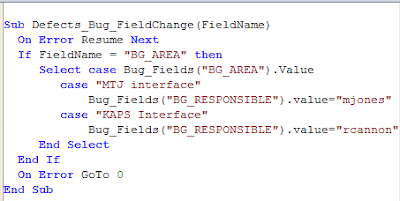
Does anyone else use bug templates?
 RSS
RSS

